![horizontal-black-3.png]](https://knowledge.cheqroom.com/hs-fs/hubfs/horizontal-black-3.png?width=200&height=37&name=horizontal-black-3.png)
The Use Case:
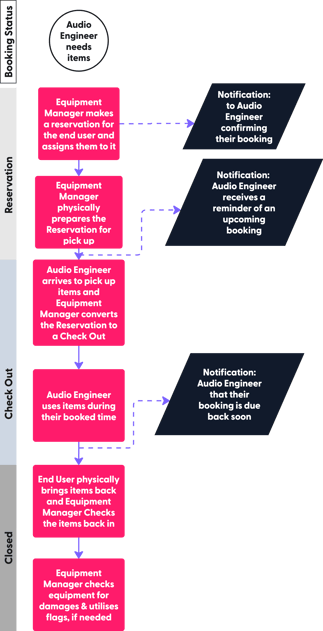
In a centralized equipment booking workflow, a single Equipment Manager handles all reservations, check-outs, and check-ins on behalf of the team. This keeps field experts — such as Audio Engineers — focused on their work while one person maintains full control over the gear lifecycle.
The Example: Sarah, an Audio Engineer, needs equipment for an upcoming festival. Alex, the Equipment Manager sitting at the heart of the Cheqroom operation, makes a reservation directly for Sarah, and a confirmation notification hits her inbox instantly.
While Sarah focuses on the project, Alex moves into the physical preparation phase, pulling the cables, consoles, and microphones from the racks and prepping the gear for pickup.
As he stages the gear, the system automatically sends Sarah a reminder of her upcoming booking so she stays on schedule.
Once the show is over, Sarah brings the items back to the gear cage, where Alex checks the equipment back into the system, inspecting the gear for damages and utilizing digital flags to mark any items that need maintenance before the next show.
The Workflow: ensures that Sarah can stay dedicated to her craft while Alex maintains total control over the gear's lifecycle from the center of the workspace.
What user roles and permissions are required for this workflow?
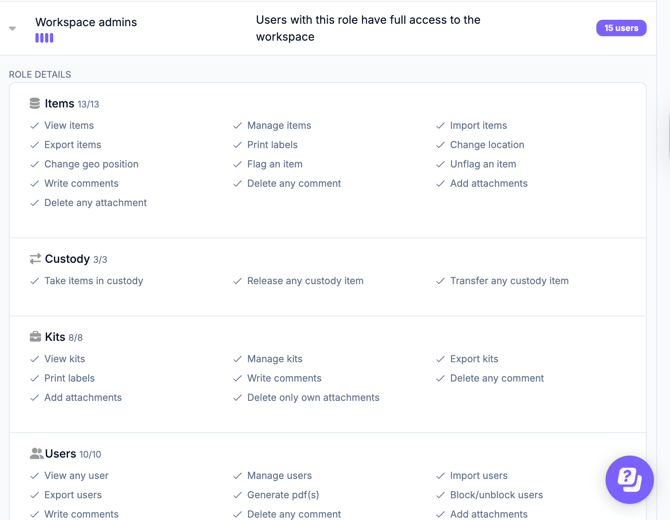
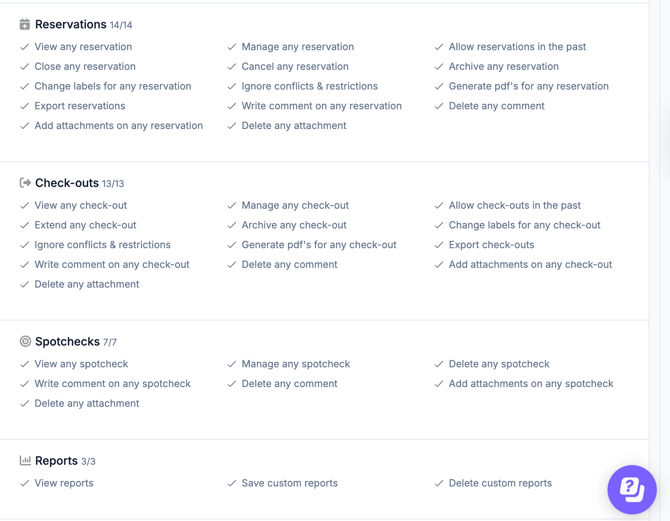
1. The Equipment Manager must be granted should be granted Workspace Admin permissions, or an equivalent custom user role. The Audio Managers do not need access to Cheqroom Workspace.
What optional features can enhance this workflow?
For high-value equipment that requires legal or financial accountability, you can layer Digital PDF Agreements onto this workflow. Every movement is then backed by a signed, legally binding document — with no manual filing system or physical clipboards required.
-
Pickup Authorization: the Audio Engineer can sign the document on their mobile device before checkout, confirming they accept responsibility for the items and agree to the company’s usage policies.
-
Post-Session Documentation: When the Equipment Manager checks the items back in, the system can generate a final "Condition Report" PDF. If damages were flagged during the check-in, these are automatically noted on the document, providing an immediate, time-stamped record that both parties can reference.
-
Key Takeaway: Integrating PDF agreements into a centralized model ensures that your team always has a bulletproof audit trail for insurance and compliance purposes without requiring a manual filing system or physical clipboards.
- Notifications can be sent to anyone, including users who don't have access to Cheqroom.