![horizontal-black-3.png]](https://knowledge.cheqroom.com/hs-fs/hubfs/horizontal-black-3.png?width=200&height=37&name=horizontal-black-3.png)
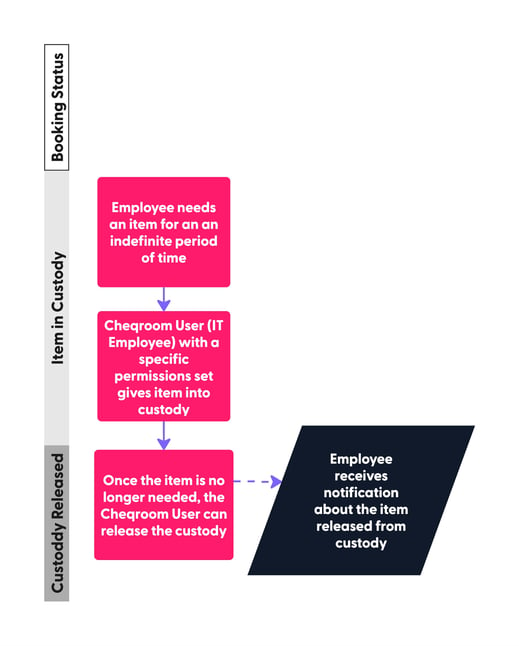
The Use Case: When a new employee needs equipment for an indefinite period, standard bookings with fixed return dates can be counterproductive. Instead of dealing with constant "Overdue" notifications, IT Managers can use the Custody feature to transition responsibility to an individual without a set deadline.
The Example: When giving out a laptop for a remote hire or specialized gear for a long-term project.
The Workflow:
The new employee receiving the gear is called an **End User** — someone who uses the equipment but does not necessarily have login access to Cheqroom. The IT Manager assigns or releases custody for an employee. To return an item from custody, the IT Manager can take custody back from the End User's profile or directly from the item's page in Cheqroom.
User Roles/Permissions for this Workflow:
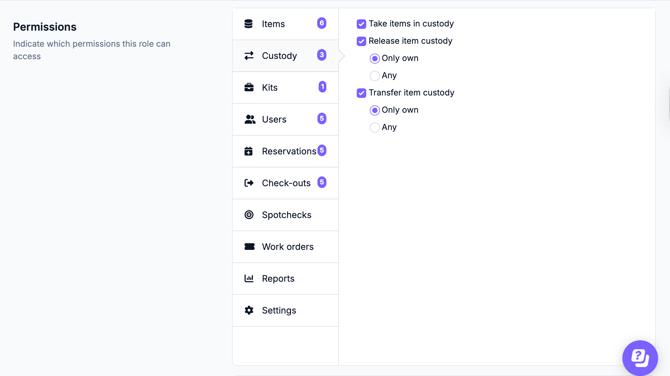
In order to be able to give or take custody, IT Managers should have the following permissions enabled: The required permissions are Give Custody and Take Custody (shown in the screenshots below).

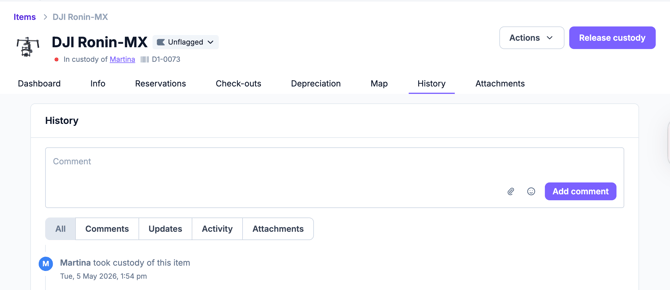
Below, see an example of the DJ Ronin - MX item in custody of Martina:
Why Use Custody?
1. Eliminates "Notification Fatigue"
If an employee has had a laptop for two years, the system will eventually flag it as "Overdue" unless someone manually extends the date dozens of times.
-
Custody stops the flood of automated "Overdue" emails that both the IT Manager and the employee eventually start to ignore. It keeps the alerts meaningful for items that actually need to come back soon.
2. High Accountability, Low Friction
Even though there isn’t a return date, the "Custody" status creates a digital paper trail.
-
In this workflow, an employee knows the item is under their name. If they leave the company or the project ends, the IT Manager doesn't have to hunt through spreadsheets to find out who has the DJ Ronin — the system clearly shows it’s with Martina.
3. Maintains Inventory Integrity
Without a Custody feature, IT Managers often just "mark as unavailable" or "hide" items that are out long-term to keep their dashboard clean.
-
Custody ensures the item stays visible in the inventory as "In Use" rather than "Missing" or "Available." This prevents the common mistake of double-booking gear that isn't physically in the office.