![horizontal-black-3.png]](https://knowledge.cheqroom.com/hs-fs/hubfs/horizontal-black-3.png?width=200&height=37&name=horizontal-black-3.png)
The Use Case: A self-service workflow in Cheqroom allows users to independently book, check out, and check in fixed assets — such as lab equipment or specialized workstations — without requiring manager approval.In many environments, assets like lab machinery, specialized workstations, or heavy tools never leave the building. Because these fixed assets remain on-site, the most efficient way to manage them is through a self-service workflow. To understand how this works in practice, let’s look at a typical day for a Lab Assistant.
The Example: A Lab Assistant needs to use a high-powered microscope located in Room 302. Instead of asking a manager if it's available, they check the nearest tablet or laptop to see the microscope's real-time availability.
The Workflow:
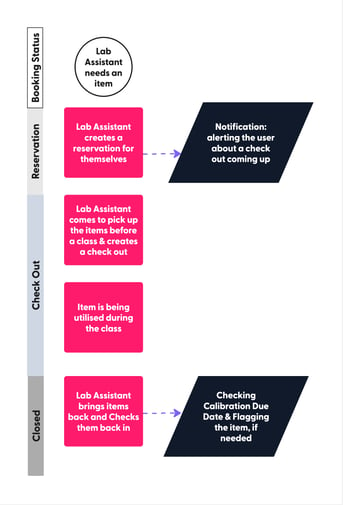
Since the microscope is a "fixed asset" (it stays in the lab), the Lab Assistant creates their own booking.
-
They select the date & time slot to reserve an item.
-
They "Check out" the item digitally the moment they begin their work.
-
No other employee or formal "approval" is required for these routine, on-site tasks.
-
Once the research session is over, the Lab Assistant "Checks in" the microscope.
-
-
This immediately flags the item as available for the next person in the building.
-
The system logs who used the equipment and for how long.
-
Helpful Additions to This Workflow
For fixed assets that require high precision, you can layer the Calibration feature onto this workflow. This ensures that while users are empowered to book equipment, they are only using items that meet safety and accuracy standards.
-
Pre-Booking Validation: Before the Lab Assistant checks out the microscope, they can view its "Calibration Due Date" directly on the item info.
-
Post-Session Flagging: If the Lab Assistant notices the equipment is drifting or performing poorly during their session, they can flag the item for "Maintenance" or "Calibration Needed" upon check-in. This immediately pulls the item out of the self-service pool until a technician clears it.
Key Takeaway: Integrating calibration into a self-service model doesn't just save time—it guarantees data integrity. It ensures your team is always using tools that are "fit for purpose" without requiring a manager to manually inspect every item between uses.
User Roles/Permissions for this Workflow:
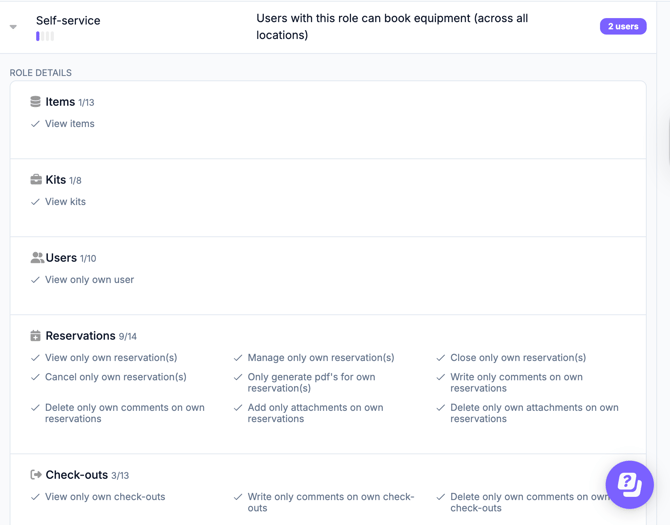
The Self-Service role is a default role built into Cheqroom. Users with this role can create and fulfill bookings for themselves. The most important permissions for this role are the ability to manage their own reservations and manage their own checkouts. To assign this role to a user, go to Settings > Users and select the appropriate role from the user's profile. The most important permissions for this role are the ability to manage their own reservation and manage their own check out.
Why Use a Self-Service Model?
-
Empowers the Team: Users take ownership of the tools they use daily.
-
Reduces Admin Burden: Managers spend less time on data entry and more time on high-level maintenance.
-
Optimizes High-Traffic Areas: By allowing users to book fixed assets on the fly, you prevent scheduling conflicts in shared spaces like labs, studios, or workshops.