![horizontal-black-3.png]](https://knowledge.cheqroom.com/hs-fs/hubfs/horizontal-black-3.png?width=200&height=37&name=horizontal-black-3.png)
The Booking Portal provides end users with a streamlined way to browse equipment and submit reservation requests without requiring access to the full Cheqroom workspace.
🔗 How to Access the Link to Your Booking Portal:
From Admin View:
-
Once enabled, your Booking Portal is accessible at:
portal.cheqroom.com/[your-workspace-id]
Note: The Booking Portal URL is tied to your workspace ID and cannot be customized. If you need to find your workspace ID, it is visible in Settings > General.
-
You can find your exact URL in Settings > Booking Portal.
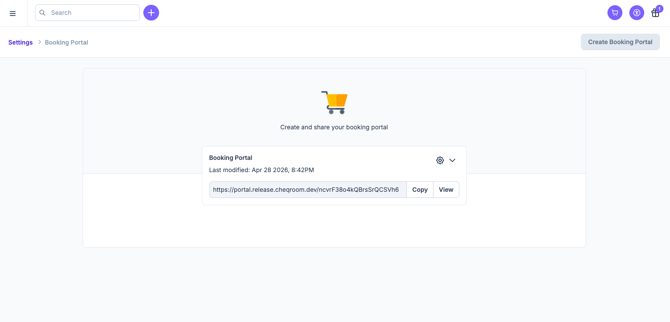
Note: This is the link you share with end users to give them access. Bookmark it or distribute it via email, QR code, or Slack.
Tip: See best practices on promoting your Booking Portal here.
From a User View:
-
Your Admin will share a Booking Portal link with you. The URL follows this format:
portal.cheqroom.com/[your-workspace-id]
Tip: Bookmark this link for quick access. When you visit it, you will be prompted to log in with your Cheqroom credentials — or via SSO if your organization uses it.