![horizontal-black-3.png]](https://knowledge.cheqroom.com/hs-fs/hubfs/horizontal-black-3.png?width=200&height=37&name=horizontal-black-3.png)
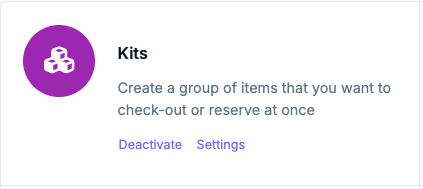
To enable kits:
- Click Settings in the bottom left corner of your screen
- Click Add-ons
- Scroll to Kits
Creating a New Kit
Manually
Note: In order for you to create your first Kit, the items that will be part of that Kit have to be already added to your account.
- Click Kits, then click New kit
- Enter a name, then add equipment by clicking Add item
- Fill in additional information (optional - Item fields)
- Upload an image or pick one from the web
- Click Add at the top of the screen
Import
If you're planning on importing your gear all at once, you might as well create an extra column for your Items to add the name of the Kit. Just make sure to always use the exact Kit name for each Item, so the system can recognize them and add them to a Kit during import.
Important
An item can only be part of one kit at a time. Think of kits as a flight-case which always has the exact same contents.
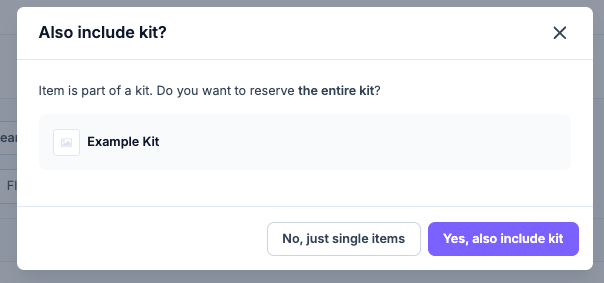
An item that belongs to a Kit can still be booked separately. You will then receive this pop-up message, to give you the option to add the entire Kit:
Locked Kits
To ensure items in a kit stay together, consider locking your kit.
When a user tries to reserve or check-out a locked kit, they are required to take all of the items in that kit into their booking, and cannot save the reservation or check-out until they do.
Never forget a necessary charging cable or battery again!
Locking a Kit
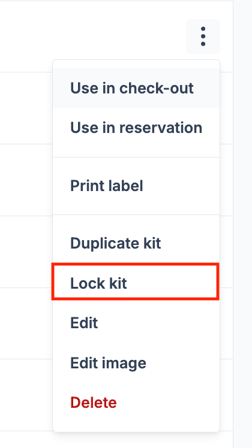
To lock a kit from the Kit Overview:
- Click Kits from the left nav
- Navigate to your selected kit
- In the overflow menu, select Lock Kit
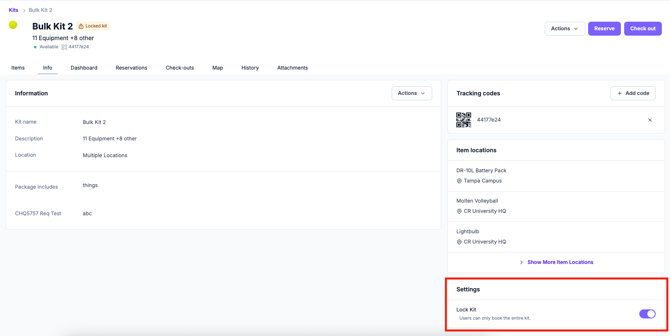
To lock a kit from the Kit Details:
- Open the Kit Details of your selected kit
- If not already selected, click on the Info Tab
- From the Settings component, toggle the Lock Kit toggle on
Unlocking a Kit
To unlock a kit, repeat these same steps, but select ‘unlock’ or switch the toggle off! Items in that kit will again be bookable independent of the rest of the kit.