![horizontal-black-3.png]](https://knowledge.cheqroom.com/hs-fs/hubfs/horizontal-black-3.png?width=200&height=37&name=horizontal-black-3.png)
Note: Operations Requests are an add on feature. Meet with us to get started.
A multi-stage project. Five separate reservations. Three different check-outs. One invoice that needs to cover all of it. Cheqroom has you covered.
1. How to Build an Invoice Work Order Template
Every billing scenario is different. Use Work Order Fields to capture the metadata your finance team or clients need on every invoice. To add invoice-specific fields, please follow these steps.
Suggestions Include:-
- Project Manager: (User field)
- Event Date / Billing Period: (Date field)
- Client or Budget Code: (Text field)
- Invoice Notes: (Text field for line-item descriptions or special terms)
Tip: Set "Client or Budget Code" as Required so every invoice work order is tied to a specific account from the start — no chasing down cost centers after the fact.
2. The Invoice Workflow
Move from scattered booking records to a clean, signed, client-ready invoice by following these steps:
|
Step |
Action |
Cheqroom Capability |
| 1. Create | Open a centralized billing ticket for the project. | Use an Invoice Work Order to group all related items, reservations, and check-outs under one record. |
| 2. Consolidate | Pull in every booking associated with the project. | Use Cross-Booking Consolidation to locate and add multi-stage line items — including staggered setups or phased deliveries. |
| 3. Enrich | Add context and metadata to the billing record. | Use Custom Fields to attach project managers, event dates, and descriptive notes to each invoice. |
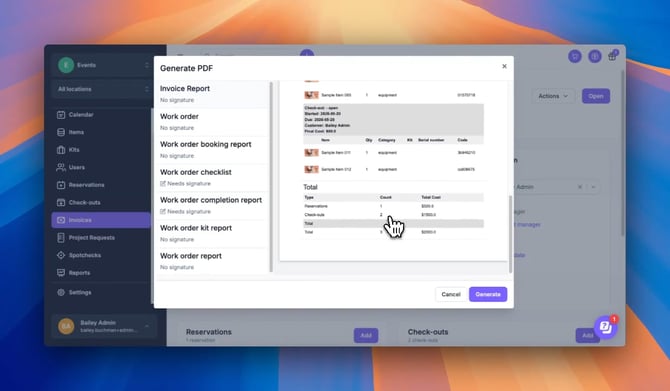
| 4. Report | Generate a financial summary automatically. | Run the Booking Invoice Report to extract costs and build a consolidated breakdown across all linked reservations. |
| 5. Sign | Collect proof of approval. | Use Digital Signature Capture directly inside the document generator to create a reliable, timestamped accountability trail. |
| 6. Deliver | Share the finished invoice. | Download the generated PDF from the Attachments folder to preview, send to a client, or archive for your records. |
3. Industry Use Cases
🎥 Media & Broadcast: Multi-Day Production Billing
- The Challenge: A single production spans three days, four locations, and a dozen separate equipment checkouts, all of which need to appear on one client invoice.
- The Edge: Use Cross-Booking Consolidation to pull every reservation and check-out into a single Invoice Work Order. Run the Booking Invoice Report once at the end of the project and the financial summary builds itself.
🎒 Higher Education: Departmental Chargebacks
- The Challenge: The AV department needs to bill individual academic departments for equipment use each semester, but the bookings happen across dozens of students and faculty members.
- The Edge: Use Custom Metadata Fields to tag each invoice with a department code or budget line. At billing time, filter and generate reports by department rather than manually cross-referencing spreadsheets.
🌏 Enterprise: Vendor & Client Accountability
- The Challenge: Coordinating external agreements or client-facing gear loans that require a signed, auditable paper trail before equipment ships.
- The Edge: Digital Signature Capture + Audit Logs. Collect a client signature directly inside Cheqroom, then verify every subsequent edit, status change, and email alert in the activity history, all without leaving the platform.
📣 Best Practices for Scaling Your Invoicing Program
- One project, one Invoice Work Order: Resist creating separate work orders for each leg of a multi-stage project. Consolidating everything under one record gives you a cleaner report and a single PDF to hand off.
- Capture signatures before gear ships: Don't wait until the return to collect sign-off. Getting a digital signature at the point of handover creates a clear line of accountability if anything is disputed later.
- Use the Audit Log as your paper trail: Every edit, status change, and automated email alert is logged in the activity history. If a client or internal stakeholder ever questions a billing record, the log tells the full story.
- Review your Booking Invoice Report before closing a project: Run the report while the project is still active, it's easier to catch missing line items now than to reopen a closed work order after the fact.
The Cheqroom Difference: Your accounting software knows what was billed. Cheqroom knows what was used, who had it, and whether it came back in one piece. Invoice Work Orders are the bridge between your equipment operations and your financial records — so the numbers your finance team sees are grounded in what actually happened on the ground.
Supporting Resource: [Video] How to Manage Invoices in Cheqroom