![horizontal-black-3.png]](https://knowledge.cheqroom.com/hs-fs/hubfs/horizontal-black-3.png?width=200&height=37&name=horizontal-black-3.png)
Note: Operations Requests are an add on feature. Meet with us to get started.
Gear that left the warehouse last Tuesday. A shipment arriving at a venue you can't verify. Three kits heading to different cities on the same day. All of this can be managed in Cheqroom.
1. How to Build a Logistics Work Order Template
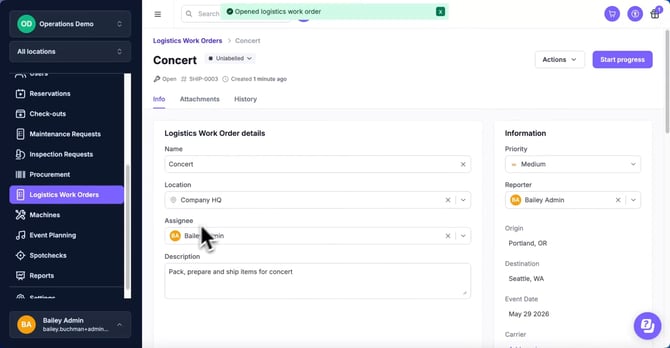
Every shipment has details that standard reservations weren't designed to capture. Use Work Order Fields to log the shipping specifics your operations team depends on. To add logistics-specific fields, please follow these steps.
Suggestions Include:-
- Origin Location: (Text or Location field)
- Destination: (Text or Location field)
- Ship Date / Event Date: (Date field)
- Transportation Method: (Dropdown: Ground, Air Freight, Hand Carry, Courier)
- Logistics Lead: (User field)
Tip: Set "Destination" as Required so every logistics work order has a clear endpoint before any gear is touched. A shipment without a confirmed destination isn't a shipment — it's a lost asset waiting to happen.
2. The Logistics Workflow
Move from a manually tracked "what went where" spreadsheet to a fully auditable, location-aware movement record by following these steps:
|
Step |
Action |
Cheqroom Capability |
| 1. Plan | Open a logistics ticket for the upcoming shipment or event. | Use a Logistics Work Order to centralize all shipping details, assets, and personnel under one record. |
| 2. Load | Add all items and kits destined for the shipment. | Use Bulk Asset Allocation to add individual items or pre-configured kits and push them to checkout in a single action. |
| 3. Override | Unblock urgent requests held up by scheduling conflicts. | Administrators can override blocks, such as buffer time, to bypass internal availability rules when a shipment can't wait. |
| 4. Track | Know where your gear is between origin and destination. | Use location updates, such as a Tive integration, to locate assets on a live map and confirm real-time whereabouts during transit. |
| 5. Verify | Confirm everything arrived in one piece. | Run a Spotcheck on arrival using field scanning tools to audit the incoming shipment and flag any discrepancies immediately. |
| 6. Return | Update asset locations when gear comes home. | After return, scan items back in to automatically update inventory record status in Cheqroom. |
| 7. Audit | Review the full movement history for any work order. | Use Audit Logs to inspect every user action, timestamp, and automated email notification tied to the shipment. |
3. Industry Use Cases
🎥 Media & Broadcast: Remote Shoot Deployments
- The Challenge: Shipping 30+ items to a location across multiple carriers, with a field team that has no visibility into what's been dispatched or when it's expected to arrive.
- The Edge: Use Bulk Asset Allocation to build out the full kit list in one pass, then share the work order with the field team so they know exactly what's coming. When the cases arrive, a Spotcheck confirms every item is accounted for before the shoot begins.
🎒 Higher Education: Inter-Campus Equipment Transfers
- The Challenge: Moving shared AV and production equipment between departments or campuses, where gear risks disappearing into a "borrowed by another building" limbo.
- The Edge: Use Logistics Work Orders to create a formal transfer record for every inter-campus move. Update location changes on return so the system always reflects where things actually are — not where they were last semester.
🌏 Enterprise: Global Roadshow & Tradeshow Logistics
- The Challenge: Coordinating simultaneous gear shipments to multiple cities or international venues, with different leads responsible for each leg.
- The Edge: Location Linkage + Audit Logs. Assign a Logistics Lead to each work order and track every action taken against the shipment in the history log. When something goes missing or a status is disputed, the audit trail tells you exactly who did what and when — across every time zone.
📣 Best Practices for Scaling Your Logistics Program
- Every move gets a work order: If equipment is leaving its home location, it needs a logistics work order. No exceptions. Informal moves — "I'll just grab it and bring it back Monday" — are where gear goes missing permanently.
- Spotcheck on arrival, not assumption: Don't mark a shipment as received until a scan-based spotcheck is complete. Counting cases is not the same as verifying contents. Catch discrepancies at the dock, not during setup.
- Update storage locations every time: A returned item that isn't re-slotted in the system is functionally invisible. Build the habit of updating asset locations as part of the check-in process so the next person searching for that gear finds it immediately.
The Cheqroom Difference: A shipping manifest tells you what was supposed to be on the truck. Cheqroom tells you what actually shipped, where it is right now, whether it all came back, and who touched it along the way. Logistics Work Orders are the connective tissue between your warehouse and the world your gear operates in.
Supporting Resource: [Video] How to Manage Logistics in Cheqroom