![horizontal-black-3.png]](https://knowledge.cheqroom.com/hs-fs/hubfs/horizontal-black-3.png?width=200&height=37&name=horizontal-black-3.png)
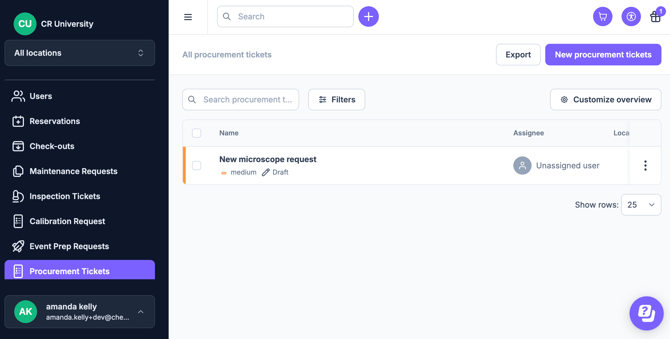
Note: Operations Requests are an add on feature. Meet with us to get started.
Procurement looks different depending on the industry, but we're here to help execute a professional procurement workflow using Cheqroom Operations Management to ensure nothing gets lost in email threads.
1. How to Create Procurement Templates
Standardize your intake by creating specific fields for different types of work (e.g., "Purchase Price"). If you need to add procurement-specific Work Order Fields, please follow these steps.
Suggestions Include:-
- Department/Cost Center: (Dropdown field).
- Quantity: (Number field).
- Preferred Vendor (Text field).
- Estimated Cost (Currency field).
Tip: Make the "Justification/Business Case" field mandatory. By requiring a brief explanation of why the asset is needed you provide the Triage team with immediate context, reducing back-and-forth communication and speeding up the approval process.
2. The Procurement Workflow Proposal
For organizations managing high-value assets, procurement is the first step in an asset's lifecycle. Here is how to execute it in Cheqroom:
|
Step |
Action |
Cheqroom Capability |
|
1. Intake |
Capture the "what, why, and when." |
Use Structured Intake Forms with custom fields for SKU, specs, and justification. |
|
2. Triage |
Review for budget alignment. |
Assign an Owner to the request to create clear accountability. |
|
3. Issuance |
Move to the ordering phase. |
Use Notes & Attachments to link vendor quotes and PDFs directly to the work order. |
|
4. Receiving |
Log the arrival of gear. |
Add new items to Cheqroom inventory the moment they arrive. |
|
5. History |
Archive for future audits. |
Cheqroom stores a Complete Service History, linking the original request to the asset forever. |
3. Industry Use Cases
🎥 Media & Production: Project-Linked Requests
- The Challenge: Tracking urgent gear purchases for specific shoots.
- The Edge: Link procurement work orders directly to a Project or Event to track costs against specific production budgets.
🎒 Higher Education & Labs: Standardized Accountability
- The Challenge: Assigning new equipment to the correct department or lab.
- The Edge: Use Required Fields for "Cost Center" and "Budget Code" to ensure financial compliance at intake.
🏢 Enterprise & IT Ops: Smart Replacements
- The Challenge: Deciding whether to repair or replace aging hardware.
- The Edge: Check the Asset History tied to the request. If an item has high maintenance costs, you can justify a replacement purchase immediately.
📣 Some Best Practices for Scaling
- Eliminate "Hallway Asks": Centralize all requests in Cheqroom to create a single thread of operational truth.
- Close the Loop: Don’t just buy gear; use the Inventory Template to ensure every new item is tagged and inspected before its first booking.
- Audit Spend: Periodically review "Draft" or "Declined" requests to identify gaps in your current inventory.