![horizontal-black-3.png]](https://knowledge.cheqroom.com/hs-fs/hubfs/horizontal-black-3.png?width=200&height=37&name=horizontal-black-3.png)
When Should You Clone a Reservation?
Here are some common situations where cloning comes in handy:
-
Class or lab reservations that repeat every semester
-
Film production gear kits used for multiple shoots
-
Event equipment checkouts that follow the same setup each time
-
Quick duplication of a reservation with just minor changes (like a new date or user)
How to Clone a Reservation
-
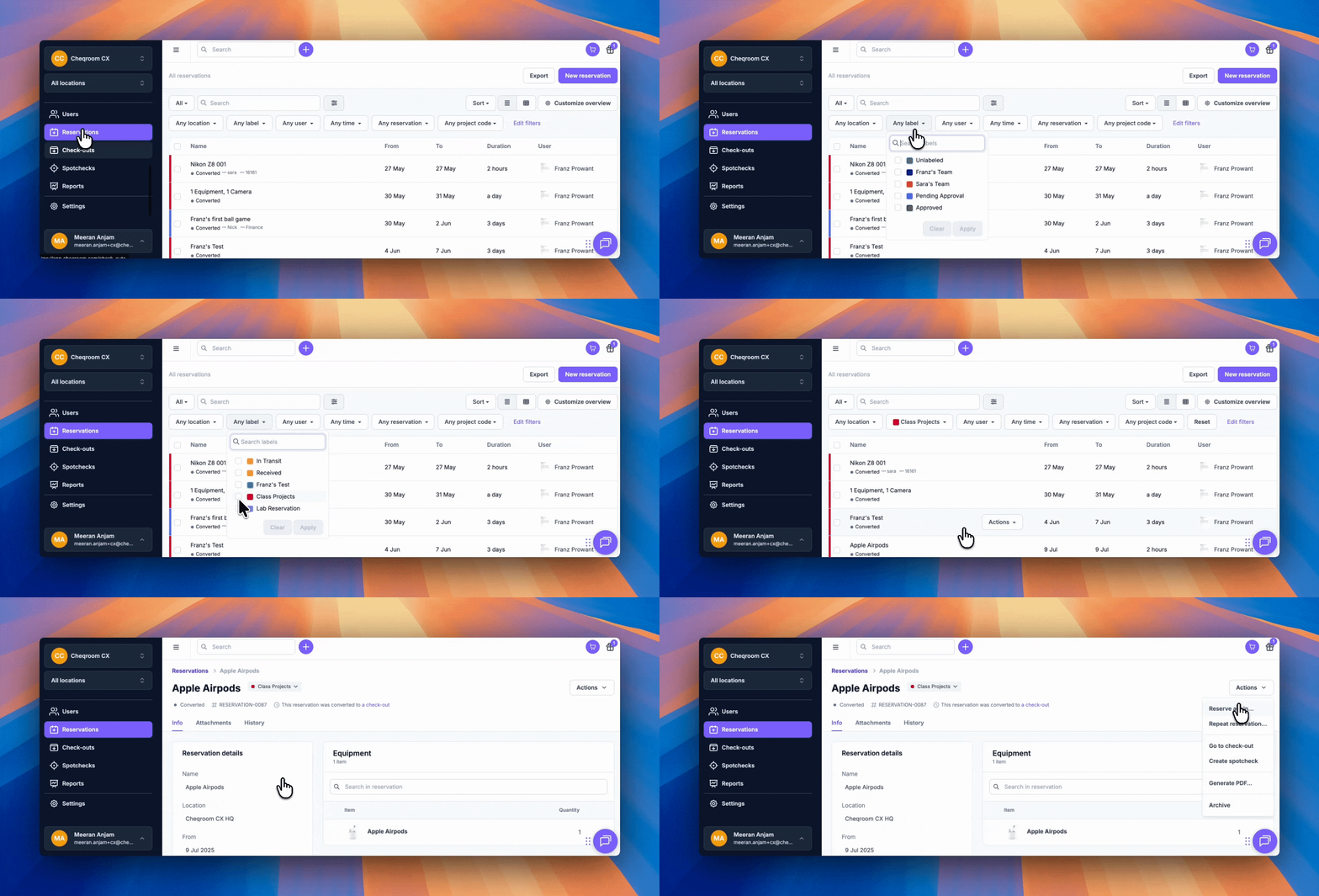
Go to Reservations in Cheqroom.
-
Find the reservation you want to clone (from either Booked or Converted status).
-
Click Actions → Reserve Again .
-
Adjust details like date, time, user assignment, or custom fields if needed.
-
Confirm and save the new reservation.
Best Practices
-
Use labels: Apply meaningful labels so cloned reservations are easy to find later.
-
Double-check the original: Make sure the source reservation has the correct items and details before cloning.
-
Update only what changes: Adjust things like the user or time without altering the rest.
-
Consider recurring reservations: If this is a truly repeating need, Cheqroom also supports recurring reservations.
Things to Keep in Mind
-
Item availability: Items may already be reserved for the new date.
-
Location settings: Make sure the reservation’s location matches your needs.
-
Notifications: Cloned reservations will generate new reminders and alerts.
-
Permissions: Only users with the right permissions can clone or create reservations for others.
Bonus Tips
-
Use colored labels to group reservation “templates.” For example, all class projects can be labeled Class Project and easily found when you need to clone them.
-
During checkout, use Equipment Picking to swap out items if the cloned reservation needs adjustments.
-
For scheduled repeats (like every month), use Recurring Reservations instead of cloning manually.
Cloning reservations in Cheqroom helps you save time, stay consistent, and manage repetitive workflows more easily. Combine it with labels and recurring reservations to get the most out of the feature.