![horizontal-black-3.png]](https://knowledge.cheqroom.com/hs-fs/hubfs/horizontal-black-3.png?width=200&height=37&name=horizontal-black-3.png)
Summary: This article explains how to manage the number of bulk items in your account, including updating quantities and switching from individual to bulk items.
If you have a few Items to add, you can input them individually. Here’s how:
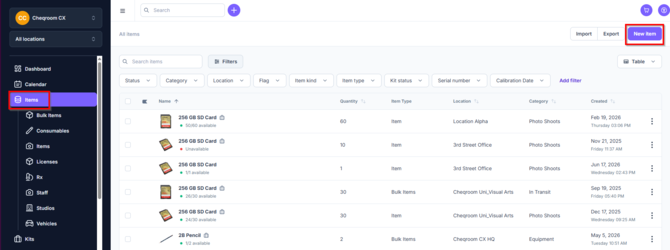
- Click on Items and then click on New item.
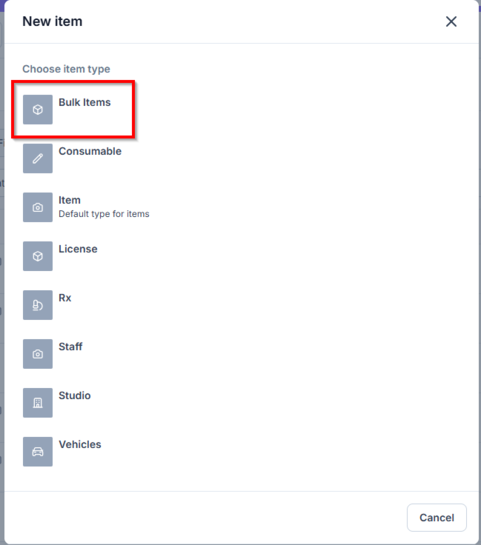
- Next, click Bulk Items.
-
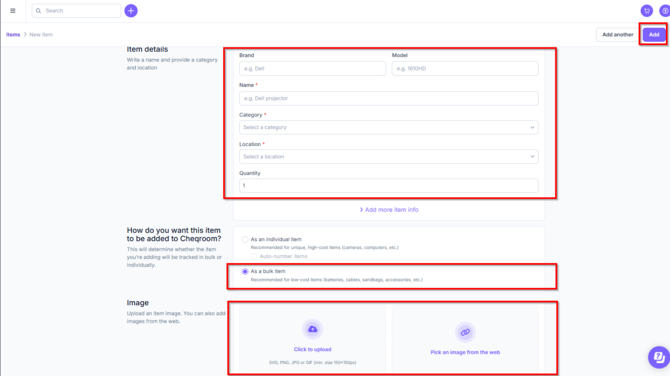
Fill in the necessary fields. By default, "Name", "Category" and "Location" are the required fields, but please ensure that all required fields are entered, as there may be custom fields as well. If you enter the "Brand" and "Model" fields, the name will auto-populate. If you have bulk items, please make sure to select "As a bulk item" as well as setting the quantity correctly. Once completed, click Add in the upper right hand corner of your account.
Updating the Quantity of Bulk Items
To update the quantity of an existing bulk item in your account, follow these steps:
- Navigate to the item details within your Cheqroom account.
- Edit the item's details and adjust the quantity field to reflect the new amount.
- Save the changes to keep your inventory accurate and up to date.
Bulk Update via Spreadsheet Import
If you need to update quantities for several bulk items at once, you can use the spreadsheet import feature:
- Go to Items in the left-hand menu and click Export to download your current inventory as a CSV file.
- Open the CSV file and update the quantity for each relevant bulk item.
- Return to Items and click Import to upload your updated CSV file.
Switching from Individual to Bulk Items
Currently, Cheqroom does not allow for the direct conversion of an existing individual item into a bulk item. To switch from tracking an item individually to managing it as a bulk item, you will need to create a new bulk item entry. Here’s how to do it:
-
Add a new bulk item:
- Go to the "Add item" screen.
- Fill in the necessary information.
- Enter the total quantity you want to track as a bulk item.
- Select the type as "Bulk Item" and complete the process.
-
Update your inventory:
- After creating the new bulk item, consider archiving or removing the individual item entries to avoid double-counting in your inventory.
Important Considerations
- All units of the bulk item will share the same characteristics and barcode.
- Bulk items are managed by quantity, meaning you do not track each unit individually.
- Bulk items are best suited for low-value assets or items where individual identification is not necessary.
Bulk Item Limits
Bulk items count toward your overall item limit in your account. If you have specific limits or restrictions in mind, please check your account settings or consult with your organization's Cheqroom administrator.
ConclusionManaging bulk items effectively in your account involves updating quantities, utilizing spreadsheet imports for bulk updates, and creating new bulk items as needed. By following these steps, you can maintain an accurate inventory and streamline your item management processes.