![horizontal-black-3.png]](https://knowledge.cheqroom.com/hs-fs/hubfs/horizontal-black-3.png?width=200&height=37&name=horizontal-black-3.png)
API authentication tokens to replace email/password authentication, offer enhanced security and easier integration by allowing you to create unique tokens for different applications.
To generate an API key, follow the below steps
-
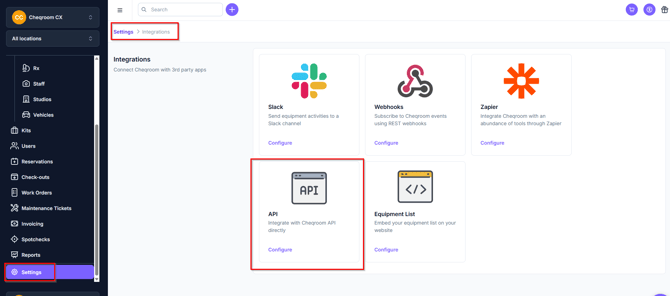
Navigate to Settings in the bottom left corner of your screen and click Integrations>API.
-
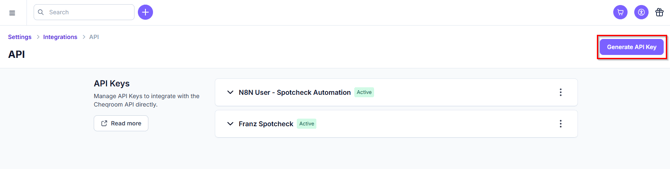
Select Generate API Key.
-
Give the key a name and optional description (example: Zapier Key)
-
Copy the key for use in integrations.
-
Open the API key details to see the linked user, created date, and last request history.
Regenerating an API Key
API keys can be regenerated for security purposes. When a key is regenerated, a new public/private key pair is created. To generate a new key, select the action button (three dots) and then “Regenerate API Key”. The key request history will persist even when keys are regenerated.
Revoking an API Key
You can remove an API key by selecting the action menu (three dot) and then “Revoke API Key”. Please note, this permanently removes your API and the key cannot be regenerated. Revoked keys will still appear in your Key list with a red dot indicating they are no longer in use.
FAQ
Do API Keys generated in Cheqroom expire?
No. API Keys do not expire. For security purposes, we recommend regenerating keys regularly.
Who can view or manage API keys?
Only the user who created a key can reveal it. Users with permission to manage integrations can see all keys and their request history, and can regenerate or revoke them.
What can an API key do?
A key belongs to the user who created it and to one workspace. It has exactly the same role and permissions as that user. To keep integrations separate from a person's login, create a dedicated integration user and generate the key as that user.
Can I see which changes came from the API?
Yes. Actions taken with an API key are logged with the key's name.
Can I rename a key?
No. Choose a descriptive name when you create it.
Can I make multiple API Keys?
Yes. We recommend making unique keys per application for security purposes. This way, you can regenerate or revoke a key for a specific application without impacting all integrations.