![horizontal-black-3.png]](https://knowledge.cheqroom.com/hs-fs/hubfs/horizontal-black-3.png?width=200&height=37&name=horizontal-black-3.png)
You can store until when your Item is in warranty and get accurate lists of equipment that is still under or no longer under warranty.
-
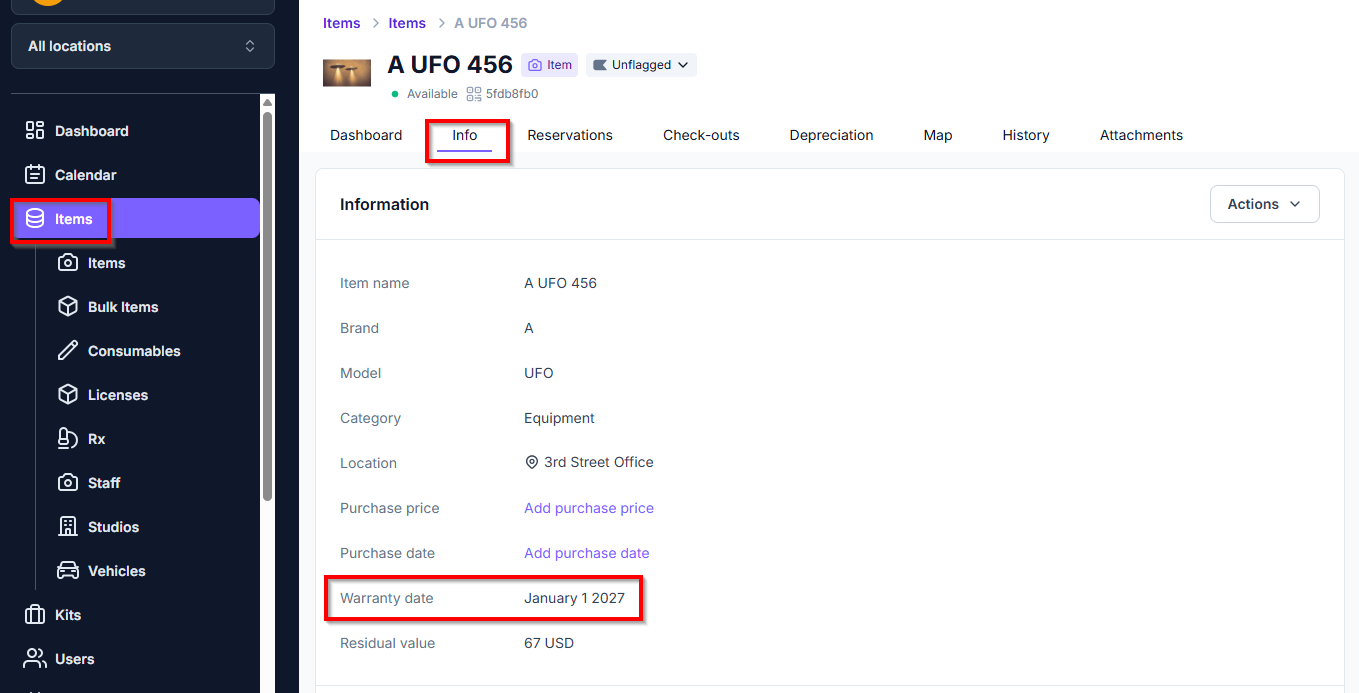
Click Items, then click an Item
-
Click the Info tab
-
Update the warranty date field
Finding back equipment that is out of warranty
-
Click Items
-
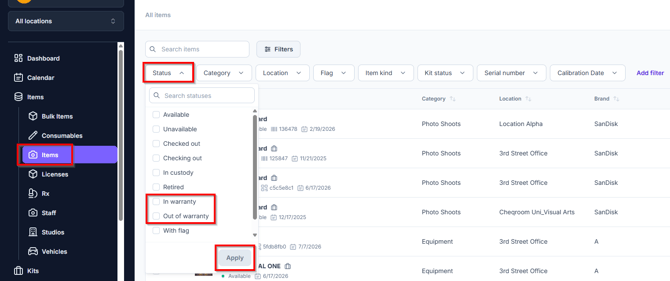
Use the Status filter and filter for In warranty or Out of warranty items (left of the search box)
Finding equipment's warranty information
-
Click on an item
-
Click on the Info tab to see the warranty field
Setting up automated warranty reminders
When you want to get an automated reminder some time before a certain item's warranty expired, you can follow these steps:
-
Go to your Settings and click Notifications
-
Click New notification and choose the trigger Warranty Expiring
-
Choose a name and when you'd like to get reminded
-
Choose who should be receiving these notifications and edit the subject line/body of the email (if necessary)
-
Review your email and when it looks good, click 'Add'

