![horizontal-black-3.png]](https://knowledge.cheqroom.com/hs-fs/hubfs/horizontal-black-3.png?width=200&height=37&name=horizontal-black-3.png)
New Features
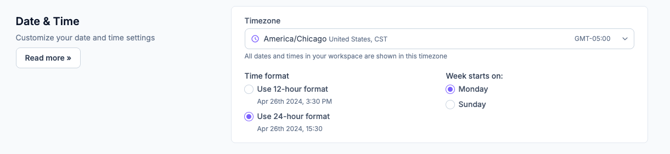
- Set Workspace Timezone in General Settings — You can now configure your workspace’s timezone directly in your workspace settings, instead of relying on the primary Account Owner's timezone.
To update this setting, go to Settings > General Settings > Date & Time.
Note: Admin-level permissions are required to change the workspace timezone.
Fixes and Updates
- Buffer Time greater than one day now displays correctly in Gantt charts on the month and year views
- The Billing Info button has been removed from the Account Settings page because it was displaying inaccurate data. An updated version is planned for a future release.
- The announcements icon has been removed. Announcements can now be found in the Resource Center at the bottom of the page.
- All users with both Booking Portal and Workspace access can find a link to the Booking Portal in their user menu
- Booking conflict checks have been moved to a backend process, ensuring they always complete before a reservation or check-out is finalized.