![horizontal-black-3.png]](https://knowledge.cheqroom.com/hs-fs/hubfs/horizontal-black-3.png?width=200&height=37&name=horizontal-black-3.png)
Applies to: Admin-based subscriptions only. If your account is on an item-based subscription (billed by the number of items in your workspace), this article doesn't apply to you — your admin users are not a billing factor. Not sure which type you're on? Reach out to your Customer Success Manager or our support team and we'll confirm.
The short version:- Standard users are unlimited on every plan tier, regardless of how much day-to-day equipment work they do.
- Admin licenses are paid seats, reserved for users who can configure or govern the account — not for users who simply manage and book items.
- Operators are paid seat type specific to operations templates (work orders), for users who are assigned to work orders
- Your billing is based on the count of admin and operator seats - not on total headcount.
What counts as "admin" activity
Admin licenses are tied to configuration and governance capabilities — the settings that shape how your whole account operates. Day-to-day equipment work is not admin activity, no matter how frequently a user does it.
|
Activity |
Counts toward an admin seat? |
|---|---|
|
Adding, editing, or checking items in/out |
No — standard user |
|
Creating or managing kits |
No — standard user |
|
Adding or managing barcodes/codes on items |
No — standard user |
|
Managing Item Groups, Item Types, or importing items in bulk |
Yes — admin |
|
Managing Categories, Locations, Users, or Templates |
Yes — admin |
|
Managing Reports or Notifications |
Yes — admin |
|
Managing Integrations, Webhooks, or SSO |
Yes — admin |
|
Managing the Booking Portal, Workspace settings, or Billing/Subscription |
Yes — admin |
In short: if a role can only touch the equipment itself, it's a standard user. If a role can change how the account is set up or governed, it consumes an admin license.
Operator seat vs. Admin role
If your account uses Work Orders, you will have an additional seat type of "Operators." This is specific to Work Orders and is a separate billing unit from admin seats.
- An Operator is the team member who executes a work order (for example, working on a maintenance task). Operators are billed as part of the Work Orders feature.
- An Admin is tied to configuration and governance permissions across your account and applies whether or not you use Work Orders. Work Order template configurations are managed through Setting -> Work Order Types, and can be changed by an admin with “Settings” permission.
A user can have both an admin role and be acting as an operator. Admin is a role with a distinct permission set, while an operator is a function a user is performing. See more on operators here
System Roles
Which standard roles count as admin seats Out of the box? Cheqroom's system roles break down as follows:
|
Standard role |
Counts as an admin seat? |
|---|---|
|
Account Owner |
Yes |
|
Workspace Admin |
Yes |
|
Front Desk Admin |
Yes |
|
Equipment Admin |
Yes |
|
Self-Service |
No |
|
Equipment Viewer |
No |
|
Booking Portal User |
No |
|
Booking Specialist |
No |
|
Work Order Agent |
No |
If you're using custom roles, whether they count as admin will depend on the specific permissions assigned to them — see the next section for how to check.
How to see which roles are marked as Admin
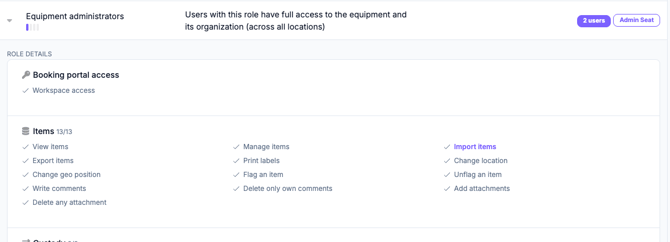
In your account, go to Settings → Role Permissions. Any role that carries one or more admin-level permissions displays an "Admin" tag next to its name. A user assigned to one of these roles will consume an admin license.
You can check which user's are admin from Users tab -> Seat type. Here you will also see users that are acting as an operator.
If you have custom roles, you can check exactly which permissions are enabled for that role from the same screen — this determines whether it's flagged as Admin. Admin permissions are highlighted in purple text. For example, an Equipment Administrator is considered an admin because they have the ability to import items.
For current per-seat pricing on your plan tier, reach out to your account manager or our support team — pricing can vary based on your specific agreement.
Frequently asked questions
A team member only adds and organizes items and kits — do they need an admin seat? No. Item and kit management (adding, editing, duplicating, retiring, adding barcodes) is standard-user activity at every tier. However, Importing items via a csv is an admin permission.
Someone on our team imports items in bulk from a spreadsheet — is that admin-level? Yes. Bulk item imports, along with Item Fields and Item Type management, are configuration-level actions and require an admin seat.
We assigned someone a custom role — how do we know if it needs an admin seat? Check Settings → Role Permissions. If the role shows the "Admin" marker, it includes at least one admin-level permission and will consume a seat. To see which permissions make the role and admin seat, expand the role definition. Any bolded, purple permission is considered an admin permission.
Does this apply to our account? Only if you're on an admin-based subscription. If you're on an item-based subscription, admin license counts don't factor into your billing at all.
How do I change a user to a standard user? Removing all admin-level permissions from a user's role (or moving them to a standard role) frees up that seat. Expand a role’s permission set and confirm that no permissions are highlighted in purple.
Have questions about your specific account or plan? Contact your Customer Success Manager or reach out to our support team at support@cheqroom.com.